Student Fee Card
Overview
A Student Fee Card is a comprehensive digital record that provides a detailed breakdown of all fees a student is required to pay and their current payment status. This feature allows administrators and faculty to quickly access complete financial information for any student, including personal details, fee structures, payment history, concessions applied, and receipt information across all academic years.
Key Features
→ Comprehensive Student Search by Hall Ticket No., Admission No., or Student Name.
→ Year-wise Fee Breakdown displaying 1st, 2nd, 3rd, and 4th year fee details.
→ Fee Type Classification showing tuition, transport, hostel, and other fee categories.
→ Concession Tracking displaying any scholarships or fee waivers applied.
→ Payment History with receipt numbers and payment dates for transparency.
→ Excess Payment Monitoring to track overpayments and pending refunds.
→ Print Functionality for generating physical copies of fee cards.
→ Read-only Access ensuring data integrity while providing comprehensive view.
Navigation Steps
Accessing Student Fee Card
- On the left side of the main menu, go to Payments → Student Fee Card.
- The Student Fee Card interface will open with search functionality.
Searching for Student Records
- Search by Hall Ticket No.: Enter the student's hall ticket number in the search field.
- Search by Admission No.: Enter the student's admission number for quick lookup.
- Search by Name: Type the student's name for name-based search.
- Click on the arrow button to execute the search and display results.
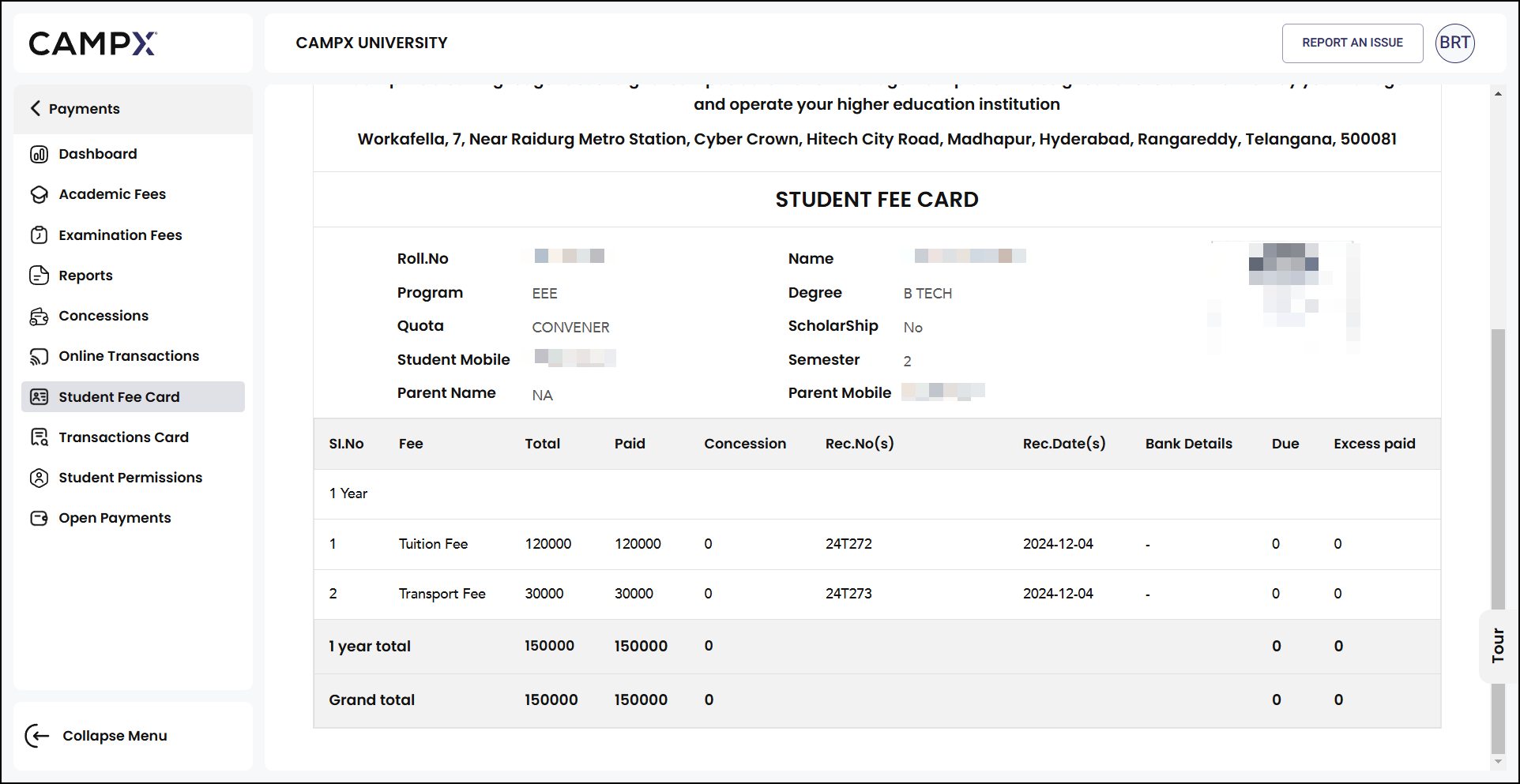
Fee Card Details
Once a student record is accessed, the fee card displays comprehensive information organized in the following sections:
Student Information Section
The header section contains essential student details:
- Roll No.: Student's unique roll number
- Name: Full name of the student
- Program: Academic program (e.g., EEE, CSE, ECE)
- Degree: Degree type (e.g., B.TECH, M.TECH)
- Quota: Admission category (e.g., CONVENER, MANAGEMENT)
- Scholarship: Scholarship status (Yes/No)
- Student Mobile: Student's contact number
- Semester: Current semester
- Parent Name: Parent/Guardian name
- Parent Mobile: Parent/Guardian contact
Year-wise Fee Breakdown
The fee card provides detailed information for each academic year:
| Column | Description |
|---|---|
| Sl.No | Serial number for each fee type |
| Fee | Type of fee (Tuition Fee, Transport Fee, Hostel Fee, etc.) |
| Total | Total amount due for the fee type |
| Paid | Amount already paid |
| Concession | Any concession or scholarship amount applied |
| Rec.No(s) | Receipt number(s) for payments made |
| Rec.Date(s) | Date(s) when payments were received |
| Bank Details | Banking information for payments |
| Due | Outstanding amount remaining |
| Excess paid | Any overpayment made by the student |
Summary Information
- Year Total: Total fees for each academic year
- Grand Total: Complete fee summary across all years
- Outstanding Dues: Any pending payments
- Excess Payments: Overpayments requiring refund processing
Print Functionality
Generating Fee Card Printouts
- After accessing the student's fee card, locate the Print button.
- Click Print to generate a physical copy of the complete fee card.
- The printout includes all fee details, payment history, and student information.
- Use printed copies for official records, parent meetings, or administrative purposes.
- Complete fee breakdown across all academic years
- Official formatting suitable for institutional records
- Student and parent contact information included
- Payment history with receipt numbers and dates
Expected Results
After accessing the Student Fee Card feature, users should be able to:
- Quick Student Lookup: Search and locate student records using multiple search criteria
- Comprehensive Fee Overview: View complete financial status across all academic years
- Payment Tracking: Monitor all payments made with receipt details and dates
- Concession Monitoring: Track scholarships and fee waivers applied to student accounts
- Due Amount Calculation: Quickly identify outstanding payments and excess amounts
- Professional Documentation: Generate printed fee cards for official purposes
Important Notes
- Proper user permissions required for accessing student financial information
- View-only access ensures data integrity and prevents accidental modifications
- Student privacy maintained through secure access controls
- Fee card reflects real-time payment status and outstanding amounts
- All transactions automatically logged with receipt numbers and dates
- Concessions and scholarships updated based on institutional approvals
- Use multiple search criteria for accurate student identification
- Verify student details before generating official printouts
- Keep printed fee cards secure as they contain sensitive financial information
- Cross-reference with payment receipts for complete accuracy
Related Documentation
- Dashboard - Access payment module overview and navigation
- Academic Fee - Process fee payments and collections
- Transactions Card - View detailed transaction history
- Reports - Generate comprehensive financial reports
- Concessions - Manage student fee concessions and scholarships
Support
Need Help?
Access Support Portal from the footer and click on "Login with CampX."